Claude Export
Export Claude chats in one click
Save chats from claude.ai as clean, usable files—without copy-paste, screenshots, or messy formatting. Keep them, share them, or move them into Notion, Obsidian, GitHub, Excel, and more.
Export the whole chat, select specific messages, or back up multiple conversations at once.
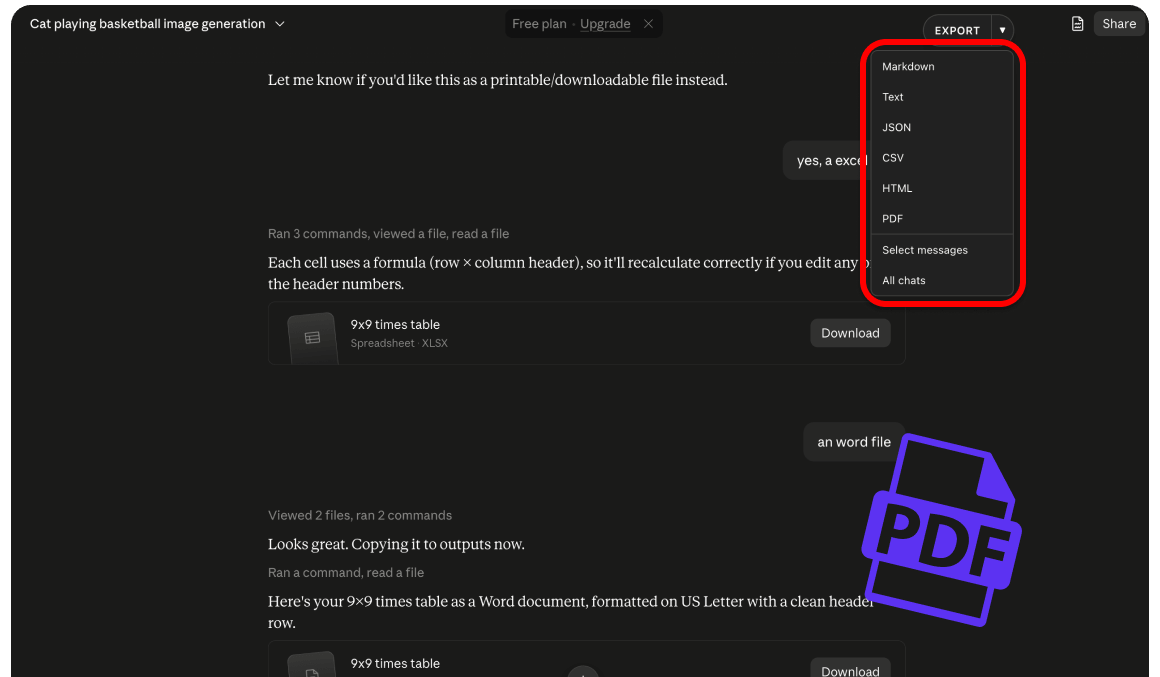
Built for real Claude workflows
Archive chats, share research with your team, and move answers into your notes—without leaving Claude.
Export this chat
One click to download the current Claude conversation in your preferred format—right from the page you are already on.
Select messages
Choose exactly which turns to keep with All, Questions, Answers, or Shift+click range select. Skip the noise and export only what matters.
Bulk conversation export
Select many conversations, track progress, pause and resume, then download. Ideal for regular archives and research backups.
Project filter
Export chats from a specific Claude Project or from all chats—so project work stays organized when you back it up.
Rich content support
Artifacts, code blocks, tables, images, file attachments, and thinking (optional) come through cleanly in your exports.
Draggable Export toolbar
A floating on-page Export toolbar follows Claude’s light and dark theme—and works on regular, Project, temporary, and shared chats.
Export formats
Pick the format that fits your workflow—notes, spreadsheets, code, or print-ready PDFs.
Markdown
.mdIdeal for Notion, Obsidian, and GitHub
Print-ready exports; bulk can merge chats into one PDF
JSON
.jsonFull structured data for developers and archives
CSV
.csvSpreadsheet-friendly for Excel and analysis
HTML
.htmlReadable in any browser
Text
.txtUniversal and lightweight plain text
When chats include images or attachments, exports are packaged as a ZIP so nothing gets left behind. Free includes unlimited Markdown, TXT, JSON, CSV, and HTML. Pricing covers PDF limits and Pro benefits.
How it works
From install to a clean download in three steps.
Install the extension
Add Claude Export from the Chrome Web Store or follow the guided install.
Open a Claude conversation
Go to claude.ai, open any chat, and keep the page loaded.
Export in your format
Click the floating Export button or the extension popup, pick a format, and download.
Simple pricing for Claude exports
Start free with unlimited text formats. Upgrade to Pro for unlimited PDF exports and branding-free files. Cancel anytime.
Free
Export Claude chats on claude.ai with the core formats and tools included.
- Unlimited Markdown, TXT, JSON, CSV, and HTML exports
- Message selector
- Bulk conversation export
- Up to 3 PDF exports per day
- Remove branding is not included
Pro
For power users who need unlimited PDF exports and clean, branding-free files.
- Everything in Free
- Unlimited PDF exports
- Remove branding from exports
- Priority support from the ExtensionsFox team
- Updates included while subscribed
Start exporting Claude conversations today
Install Claude Export and save chats to PDF, Markdown, JSON, and more—the way you actually use them.
Get Claude ExportFrequently asked questions
Which sites are supported?
Use Claude Export on claude.ai. Open a conversation, then export from the popup or the on-page Export button. It works on regular chats, Project chats, temporary chats, and shared conversation pages.
What is included in Free vs Pro?
Free includes unlimited Markdown, TXT, JSON, CSV, and HTML exports, message selection, and bulk backup, plus up to 3 PDF exports per day. Pro unlocks unlimited PDF exports and removes “Powered by Claude Export” branding.
Is Claude Export affiliated with Anthropic or Claude?
No. Claude Export is published by ExtensionsFox and is not endorsed by or affiliated with Anthropic or Claude. Trademarks belong to their respective owners.
What should I know about terms of use?
You are responsible for complying with Anthropic’s terms of service, applicable laws, and any agreements that govern your access to Claude content. Use the extension only on chats you have access to.
Do you store the chats I export?
Claude Export only runs on claude.ai to read conversations you choose to export and to download related assets. Settings and subscription status are stored locally in the extension. This marketing site does not run exports for you. Refer to our Privacy Policy for how ExtensionsFox handles support or account-related data.
Who can I contact for help?
Email help@extensionsfox.com with questions about billing, installation, or troubleshooting.